Lenovo Thinkpads from the 2010s were unkillable beasts
In my ever so humble opinion, Lenovo Thinkpads from the 2010s were the epitome of what a laptop should be. The keyboard feels so smooth. They had two batteries which was like having a motorcycle with auxillary fuel tank: easy to forget about but lifesaving when you needed it. When the main battery drains, the internal second battery kept things going and letting you save what you’re working on without losing it.
You can’t ask for a more solid body on a laptop, too. And they were perfect for covering the laptop cover with stickers. Best of all? Throw linux on one of these beasts and you’ve got another 5-10 years of use.
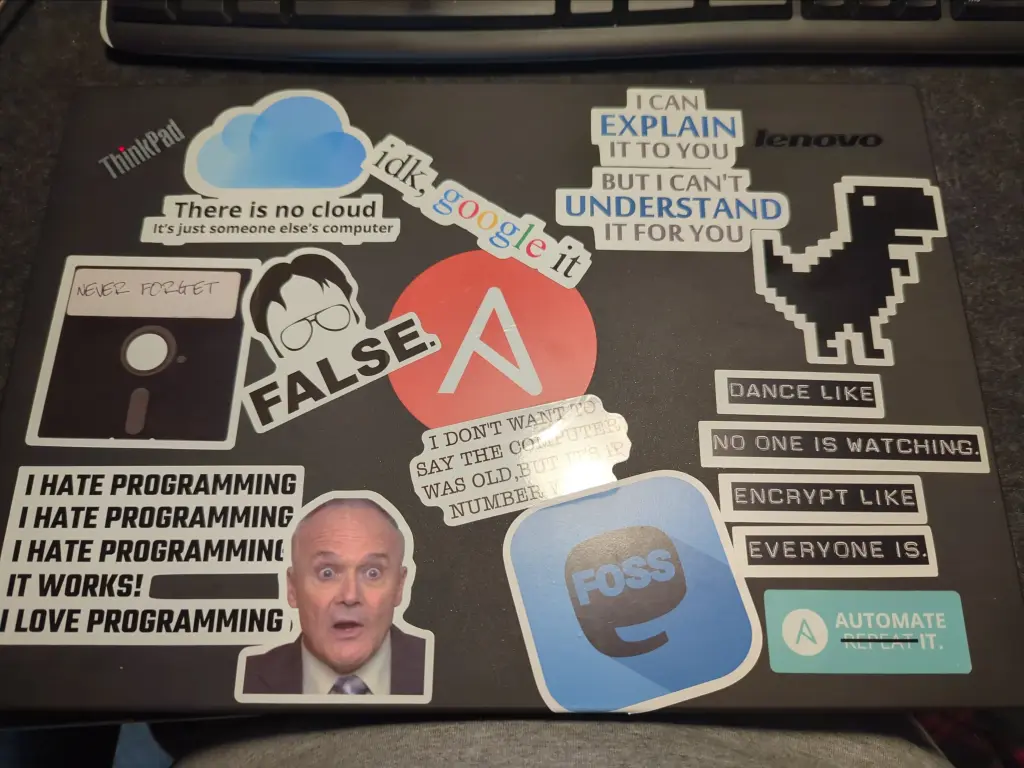
Installing linux extended my T440’s lifespan
Point-in-case: mine is a T440. Not even a T440P or S. Just a plain ol’ T440 from circa 2013-2014. I didn’t even buy this one new. If I recall, I bought it used on ebay for a couple hundred bucks. I used the hell out of it, too. The first time I ever tried linux was on this laptop. If I recall correctly, I started with fedora, then tried kali (I was a network engineer at the time), then ubuntu, and eventually mint.
Knowing what I know now, I should have started with Mint. It really is the most beginner-friendly version of Linux. Hell, I still have Mint on this thing. When I pulled it out of the bin last week, just seeing the stickers on the cover gave me this comforting feeling of nostalgia.
Luckily, the charger was in the same bin and this beast has the larger removable battery so I knew it’d outlast my old laptop I just bought three years ago. I charged it up and low and behold, it booted right up and the battery charge lasts forever.
However, I discovered a few things I didn’t like that likely were the reason I stopped using it. First, the screen wasn’t even 1080p. Second, this version of the T-series laptop has the worst touchpad. Google it - you’ll see.
Apart from those two things, I was content. I’m not a gamer so I don’t need a powerful graphics card. I’m not even much of a power user, either. I use this laptop to write these posts, check out Mastondon and Lemmy, and ssh into my desktop computer that acts as a server for my many docker containers.
I discovered on Lemmy that the T440 had a few mods I could make to it to make it perfect.
Mod #1: The screen
The first thing I focused on was updating the screen to a 1920x1080 replacement screen. I spent a lot of time researching this to make sure I bought the right one. I ended up buying one that was listed as a “14” FHD led lcd screen for Dell MNP4W B140HAN01.3 30 pin non-touch” from the seller “CDSPARTS” for $47.99. It didn’t come with any instructions or additional parts other than the screen.
Once I received it, I got to work replacing the current SD screen. Honestly, it kind of sucked.
The T440 uses a thin plastic sticker on the inside of the laptop that acts like a bezel. The problem is, I didn’t realize it at first and stuggled for a while trying to separate the bezel from the case so I can replace this damn screen. Eventually I noticed the thin plastic sticker and managed to peel each corner back enough to expose the screws that kept the actual bezel attached. Unfortunately I didn’t have enough common sense to use the iOpener tube I just got from iFixit and instead, I used force to peel back the sticker part. The force from pulling on the cheap plastic caused a few parts to permanently ripple from being stretched to far and I have to live with that for now. Really, it’s not a big deal.
Once I got the whole bezel off, the swap wasn’t too difficult. I had to unscrew the hinges and disconnect some cables (the wifi antenna, screen power/data, etc). Swapping the actual screen was a breeze - just a few screws at the top and bottom, remove the old screen, replace it with the new screen, and put the screws back in. Even reconnecting all the cables was simple enough, although the antenna cables were a little bit of a pain. I put everything back together and powered up the laptop and checked the display settings and to my pleasure and relief, I saw “1980x1080.” But the screen was dim.
After some troubleshooting, I discovered the ebay seller that I bought the screen from either made a mistake or was dishonest. The model number they listed the screen as a B140HAN01.3, which uses an optical display mode of ‘IPS’. However, when I ran an edid-decode on the screen, I discovered the screen I received was actually an Innolux N140HGE-EAA which uses TN as an optical display mode. TN displays are notoriously less vibrant than IPS displays. Always verify the hardware you receive matches the product number you ordered!
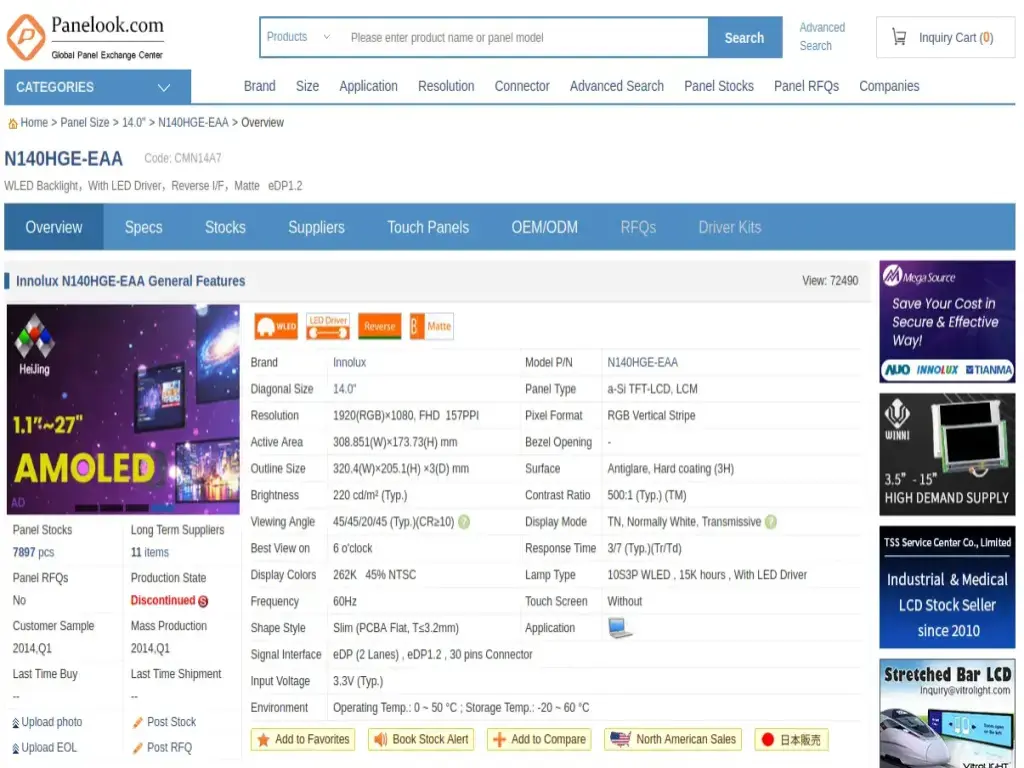 Check out this article on RTINGS.com for a great explanation of the differences between IPS and TN.
Now I need to swap the screens back to return the new one, then try to find the correct screen from a reputable source.
Mod #2: The touchpad
Luckily, the next upgrade went smooth. It resolved the only other issue I ran into - the touchpad. I found out the touchpad for the T450 was a major improvement and it’s compatible with the T440, so I went back to ebay and quickly found a replacement touchpad for $17.99 from a seller called “Thinkpad Grocery” with a listing for, “Thinkpad T440 T450 W541 T460P T470 E460 T560 S531 S5 W540 Touchpad 3 Three Keys.”
Installing the new touchpad proved to be much more difficult because I had to take the motherboard out to access the touchpad screws. Actually, I’m not sure if there’s a faster way to swap the touchpad without removing the motherboard, but I couldn’t figure one out.
I booted my T440 up and the touchpad worked like a charm. It didn’t require any updates or new software and I love having physical buttons now.